Compress PDF Files Privately
Reduce PDF file size locally in your browser. Your documents are processed entirely on your device and are never uploaded to any server.
Select PDF File
Supported: PDF documents up to 100MB.
How your PDF is processed
In-Browser Execution
All parsing, image downsampling, and PDF rebuilding happen locally in your web browser tab. Once the code is loaded from the CDN, processing runs client-side on your device CPU.
No Server Transmission
We do not upload or send your documents to any remote cloud servers. Once you refresh or close this tab, the file data in the browser memory is discarded.
1MB PDF - Perfect Balance of Size & Quality
- 📊Professional Documents: Business reports, presentations, proposals
- 📧Email Friendly: Small enough for quick email sending
- 🎨Quality Preserved: Maintains image quality and text sharpness
- ⚡Fast Loading: Quick to download and view on any device
Compress PDF to 1MB - Light Compression for Professional Use
Need to reduce PDF file size while maintaining professional quality? Our free PDF compressor uses light compression to reduce your file to 1MB or less while preserving image quality, text sharpness, and document formatting - perfect for business documents, presentations, and reports.
Why 1MB is the Sweet Spot
- Email Friendly: Small enough to send via email without issues
- Quality Preserved: Large enough to maintain good image quality
- Fast Loading: Quick to download on any internet connection
- Professional Standard: Accepted by most business platforms
- Mobile Compatible: Easy to view on smartphones and tablets
✅ Perfect Balance:
1MB offers the best balance between file size and quality. It's small enough for easy sharing but large enough to preserve professional-quality images and formatting!
What Fits in 1MB?
Professional Documents:
- 10-15 page business report with images
- 5-8 page presentation with graphics
- 20-30 page text-heavy document
- Portfolio with 5-10 high-quality images
- Product catalog with photos
Common Use Cases:
- Business proposals and contracts
- Marketing materials and brochures
- Technical documentation
- Research papers with charts
- Annual reports and white papers
How to Compress to 1MB
- Upload your PDF (any size)
- Select "Light" or "Low" compression level
- Click "Compress PDF Now"
- Download compressed PDF under 1MB
- Share via email or upload to platforms
💡 Pro Tip:
For professional documents, always use "Light" compression when targeting 1MB. This preserves image quality and ensures your document looks polished and professional!
Quality Comparison
At 1MB Compression:
- ✅ Text remains crystal clear
- ✅ Images maintain good quality
- ✅ Charts and graphs stay readable
- ✅ Colors remain vibrant
- ✅ Formatting preserved perfectly
Compared to Smaller Sizes:
- 100KB: Extreme compression, visible quality loss
- 200KB: Aggressive compression, some pixelation
- 500KB: Medium compression, acceptable quality
- 1MB: Light compression, excellent quality ✅
When to Use 1MB Compression
- Client Presentations: Maintain professional appearance
- Business Proposals: Quality matters for first impressions
- Marketing Materials: Images need to look sharp
- Technical Docs: Diagrams must be clear
- Portfolio Work: Showcase your best work
⚡ Quick Guide:
Original 5MB → Compress to 1MB = 80% size reduction with minimal quality loss. Perfect for professional use!
Platform Compatibility
1MB PDFs work perfectly with:
- Email (Gmail, Outlook, Yahoo - all support 1MB easily)
- Cloud storage (Google Drive, Dropbox, OneDrive)
- Business platforms (Slack, Teams, Asana)
- CMS systems (WordPress, Drupal, Joomla)
- Mobile devices (quick to download and view)
Tips for Best Results
- Use Light Compression: Preserves maximum quality
- Optimize Images First: Resize large images before creating PDF
- Remove Unnecessary Pages: Keep only essential content
- Avoid Embedded Fonts: Use standard fonts to reduce size
- Test Before Sharing: Always review compressed PDF
Professional Standards
Industry Recommendations:
- Business Reports: 1-2MB ideal
- Presentations: 1-3MB acceptable
- Proposals: Under 1MB preferred
- Marketing PDFs: 500KB-1MB optimal
- Technical Docs: 1-5MB depending on content
✅ Why This Tool:
Free forever | Privacy safe (browser-based) | No file limits | Multiple compression levels | Instant results
Alternative Options
If 1MB is still too large:
- Try 500KB: Medium compression, still good quality
- Split Document: Divide into multiple files
- Remove Images: Create text-only version
- Use Cloud Link: Upload to Drive and share link
If you need larger size:
- Keep at 2-3MB: For image-heavy documents
- Minimal Compression: Preserve maximum quality
- Use Cloud Storage: For very large files
Related Conversion & Utility Tools
Handpicked utility tools from the same category that you might find useful.
Related Articles
Insights and guides to help you make the most of our tools.

Is Your 'Free' PDF Converter Stealing Your Data? Why Server-Side Uploads Are Dangerous
You just uploaded your bank statement to a free PDF converter. Do you know where it went? Read this urgent guide on the dangers of server-side data extraction and how to protect yourself.
How to Compress a PDF Without Uploading It
Need to shrink a PDF document but worried about data leaks? Learn how browser-based compression works, its security advantages, and technical limitations.
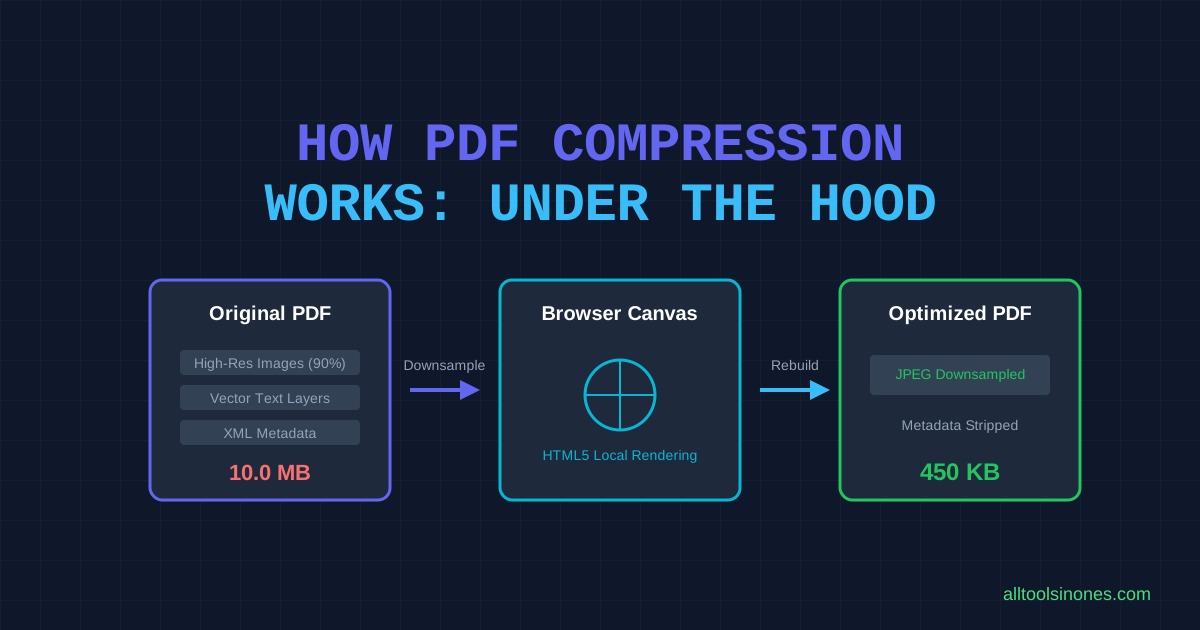
How PDF Compression Works: What Happens to Your File
Ever wondered what actually happens when you compress a PDF? Take a deep look into images, layouts, local rendering, and quality tradeoffs.