PDF to Image Converter
Extract pages from PDF and save them as PNG, JPG, or WebP. Private, secure, and client-side.
What Is a PDF to Image Converter and Why Use a PDF to Image Converter to Convert JPG to PDF?
A PDF to image converter is a powerful online tool that extracts individual pages from PDF documents and saves them as image files. Whether you need to convert PDF to JPG for editing, turn PDF into image files for presentations, or export PDF as JPEG for web publishing, this versatile tool handles all your conversion needs. The PDF to image functionality also works bidirectionally—you can convert JPG to PDF when you need to compile images into documents.
How a PDF to Image Converter Helps Convert JPG to PDF and Convert PDF to JPG
Modern workflows demand flexibility when handling documents. When you need to convert PDF to JPG for image editing or JPG to PDF for document creation, traditional software requires expensive licenses and complex installations. Our PDF to image converter eliminates these barriers. Simply upload your PDF, select pages, choose your output format (PNG, JPEG, or WebP), and convert PDF to picture instantly.
The tool supports comprehensive bidirectional conversion. You can convert PDF file to JPG to extract specific pages, or convert JPG to PDF to create multi-page documents. This flexibility makes it invaluable for professionals who frequently work between image and document formats. Whether you're converting PDF to pic for social media or need to format PDF to JPG for editing, everything happens in seconds.
When to Use an Online PDF to Image Converter vs Desktop Tools
Desktop PDF software often costs hundreds of dollars and requires installation on every device you use. In contrast, you can convert PDF to JPG free using our online tool without any downloads. The convenience of accessing the PDF to JPG converter download-free service from any device—whether Windows, Mac, Linux, or mobile—makes it the preferred choice for millions of users worldwide who need to convert PDF to JPG online.
How the PDF to Image Converter Works to Convert PDF to JPG and Turn PDF Into Image
Understanding how to turn PDF into image files helps you appreciate the technology. When you convert PDF to picture, the tool renders each PDF page using advanced browser-based rendering engines, then captures that rendering as a high-quality image file. This process preserves text clarity, graphics quality, and layout integrity while creating universally compatible image files.
The Technology Behind PDF to Image Converter and Convert PDF in To JPG
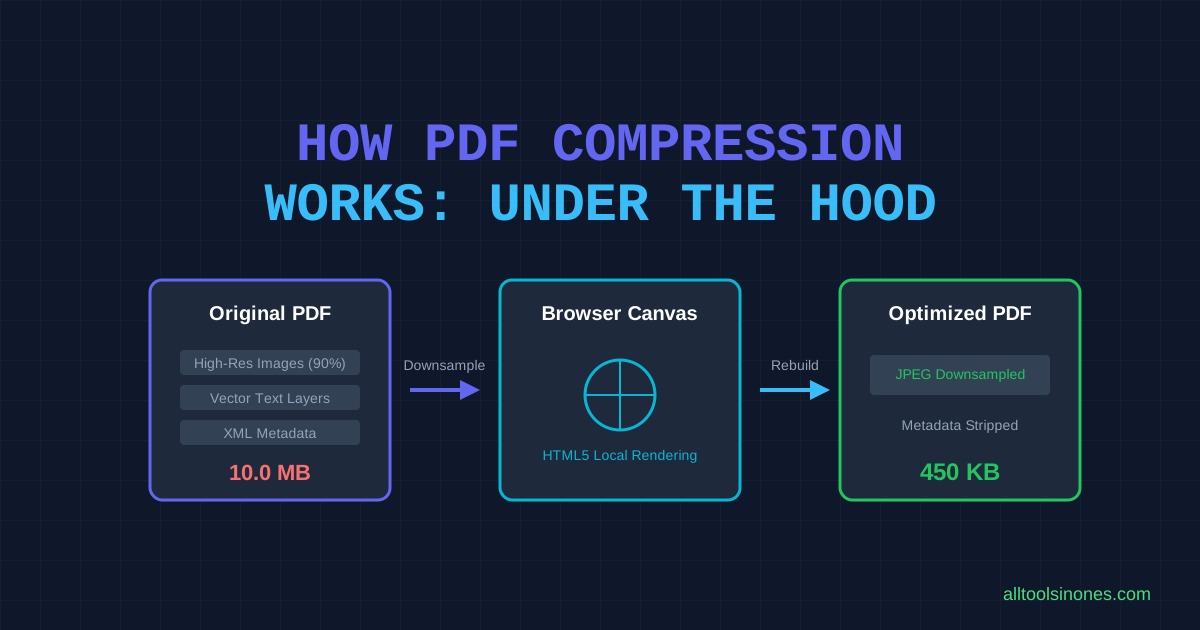
Our PDF to image converter uses sophisticated JavaScript libraries that run entirely in your browser. When you upload a PDF to convert PDF in to JPG, the tool loads the PDF, renders each page onto an HTML5 canvas at your specified resolution, then exports that canvas as an image file. The PDF to JPG online process handles complex PDFs with embedded fonts, images, and vector graphics seamlessly.
For reverse conversion, when you need to convert JPG to PDF, the process embeds your images into a PDF document structure. This image to PDF capability is particularly useful when you need to compile multiple photos or scans into a single, shareable document. The tool can merge JPG to PDF or combine images into PDF with professional results.
Why Browser-Based Convert PDF to JPG Free Tools Are Secure and Fast
Security concerns plague traditional online converters that require file uploads. When you convert PDF to JPG free using cloud-based services, your files travel across the internet to remote servers where they're processed and potentially stored. Our browser-based approach eliminates these risks entirely. All processing happens locally on your device when you convert PDF to JPG online free, meaning your sensitive documents never leave your computer.
Client-Side Processing for Convert Image In To PDF and Convert PDF to Picture
This client-side architecture makes it safe to convert PDF to picture even for confidential business documents, medical records, or legal paperwork. You can PDF into picture conversion with complete confidence that your privacy is protected. No server logs, no data retention, no third-party access—just pure, local processing power that keeps your files secure while you convert image in to PDF or extract pages.
How to Use Our PDF to Image Converter to Convert JPG to PDF and Merge JPG to PDF (Step-by-Step)
Step 1 — Upload or Drag & Drop Files to Convert JPG to PDF or Create PDF From Images
Start by uploading your PDF file. You can drag and drop directly into the upload zone or click to browse. Our PDF to image converter supports all standard PDF files. If you need to convert JPG to PDF instead, simply switch to the Image to PDF mode and upload your photos to create PDF from images.
Step 2 — Arrange, Merge JPG to PDF, or Export PDF to JPG High Quality
Once uploaded, select which pages you want to convert PDF to JPG. Choose your output format (PNG for lossless quality, JPEG for smaller files, or WebP for modern compression). Set quality and DPI settings to ensure PDF to JPG high quality output. If you're working in reverse and need to merge JPG to PDF, arrange your images in the desired order before conversion.
Step 3 — Download Result After You Convert PDF to JPG or Convert Image to PDF
Click the convert button to turn PDF into image files. The conversion typically takes 2-15 seconds depending on PDF size and page count. Download individual images or use the ZIP export feature for batch downloads. The tool names files clearly (filename-page-01.jpg) for easy organization.
Best Use Cases for a PDF to Image Converter: From JPG to PDF and PDF to Image Tasks
Students and Educators Using Convert Photo to PDF and Turn Picture Into PDF
Students frequently need to convert PDF to JPG to extract diagrams from textbooks or convert photo to PDF when submitting assignments. Teachers use the tool to turn picture into PDF for creating study materials and to convert PDF to picture for presentations.
Business Users Who Need to Convert JPG to PDF and Combine Images Into PDF
Office workers use PDF to JPG online conversion to extract charts from reports or convert JPG to PDF to compile scanned documents. The ability to combine images into PDF helps create professional presentations and reports.
Creatives & Photographers Using Image to PDF Converter and Convert PNG File to PDF
Designers need to convert PDF to JPG to edit specific pages in Photoshop. Photographers convert PNG file to PDF to create portfolios and use image to PDF converter tools to deliver client galleries.
Key Features of Our PDF to Image Converter That Make Convert JPG to PDF Easy
Batch Convert JPG to PDF and Merge JPG With PDF in Seconds
Process multiple pages simultaneously when you convert PDF to JPG. The batch export feature lets you merge JPG with PDF or extract all pages at once, saving hours compared to manual page-by-page conversion.
High Quality Export When You Convert PDF to JPG High Quality or Export PDF as JPEG
Quality controls ensure professional results when you convert PDF to JPG high quality. Adjust DPI settings up to 300 for print-quality output or export PDF as JPEG with custom compression for web use.
Support for PNG to PDF, TIFF to PDF, and Convert Photo to PDF Free
Multi-format support includes PNG to PDF, TIFF to PDF, and standard JPG to PDF conversion. You can convert photo to PDF free in any common image format.
Privacy, Security, and Performance of Our PDF to Image Converter for Convert JPG to PDF Free
Why No-Upload Local Processing Is Best for Convert JPG to PDF Free and Convert PDF in To JPG
When you convert JPG to PDF free or convert PDF in to JPG using our tool, everything processes locally in your browser. Your files never leave your device, ensuring complete privacy for sensitive documents.
Handling Large Files When You Convert Image In To PDF or Convert PDF File to JPG
The tool efficiently handles large PDFs when you convert PDF file to JPG. For very large files, process pages in batches to maintain optimal browser performance.
Performance Tips When You Combine Photos Into PDF or Merge JPG to PDF
For best performance when you combine photos into PDF or merge JPG to PDF, compress images before conversion and process in batches of 20-30 pages for large documents.
Troubleshooting and Tips When You Convert JPG To PDF or Convert PDF To JPG Online
How to Fix Low-Quality JPG to PDF Conversions and Increase PDF to JPG Quality
If your JPG to PDF output looks blurry, ensure source images are high resolution. For PDF to JPG conversion, increase the DPI setting to 150 or 300 for better quality.
Common Errors When You Convert PDF to Image and How to Resolve Them
If conversion fails when you convert PDF to image, try reducing the page range or clearing browser cache. For protected PDFs, ensure you have permission to extract content.
Tips to Optimize Images Before You Turn Picture Into PDF or Convert Photo to PDF Free
Before you turn picture into PDF, crop unnecessary whitespace and adjust brightness/contrast. This ensures better results when you convert photo to PDF free.
FAQ About PDF to Image Converter, Convert JPG to PDF, and PDF to JPG Online
Can I Convert JPG to PDF Free Without Installing Software?
Yes! Our convert JPG to PDF free tool runs entirely in your browser. No downloads, no installations—just instant conversion from any device.
How Do I Convert PDF to JPG High Quality Using This PDF to Image Converter?
To convert PDF to JPG high quality, select the highest DPI setting (300 DPI) and choose PNG or high-quality JPEG output. This ensures crisp, clear images perfect for printing or professional use.
Can I Merge JPG to PDF and Convert Multiple Images Into One PDF?
Absolutely! You can merge JPG to PDF by uploading multiple images and arranging them in order. The tool will combine images into PDF as a single multi-page document.
Is a Browser-Based Image to PDF Converter Free and Secure?
Yes! Our image to PDF converter free processes everything locally in your browser. Your files never leave your device, ensuring complete privacy and security.
How Many Photos Can I Combine Images Into PDF at Once?
You can combine images into PDF with no artificial limits. Most browsers handle 50-100 images easily. For larger batches, process in groups for optimal performance.
Will OCR Online Work When I Convert Image to PDF and Then Extract Text?
While this tool focuses on convert image to PDF conversion, you can use our separate OCR online tool to extract text from images or PDFs after conversion.
What File Types Can I Convert to PDF (PNG to PDF, TIFF to PDF, etc.)?
We support all common formats: PNG to PDF, TIFF to PDF, JPG/JPEG, WebP, and HEIC. You can convert PNG file to PDF or any other image format seamlessly.
Can I Convert PNG File to PDF and Then Convert PDF to PNG?
Yes! You can convert PNG file to PDF using our Image to PDF tool, then use this PDF to Image tool to convert PDF to PNG or any other format. Both directions work perfectly.
Is There Any Limit on File Size for Convert JPG to PDF Free?
There's no artificial file size limit when you convert JPG to PDF free. However, very large files (over 25MB per image) may take longer to process depending on your device's capabilities.
How Fast Is the Convert JPG to PDF Process on a Typical Browser?
The convert JPG to PDF process typically takes 2-10 seconds for standard images. Batch conversions with multiple images may take 10-30 seconds depending on image count and size.
Conclusion — Use Our PDF to Image Converter to Convert JPG to PDF and Convert PDF To JPG with Confidence
In today's digital workplace, the ability to quickly convert PDF to JPG or convert JPG to PDF is essential for productivity. Whether you're a student extracting diagrams, a professional creating presentations, or a designer editing documents, our PDF to image converter provides the perfect solution without compromising privacy or requiring expensive software.
What makes our PDF to JPG online tool exceptional is the combination of powerful features, absolute security, and zero cost. You can convert PDF to JPG free, merge JPG to PDF, combine photos into PDF, and turn PDF into image files all within the same interface. The browser-based architecture ensures your files remain private and secure, never leaving your device during processing.
Ready to experience the fastest, most secure way to convert PDF to picture or convert photo to PDF? Try the PDF to Image Converter now — upload images to convert JPG to PDF or export PDF to JPG instantly. Join millions of satisfied users who trust our platform for all their PDF and JPG conversion needs.