What does PDF compression do?
PDF compression reduces the storage footprint of PDF documents, making them easier to send over email, upload to application portals, or archive. Many services, such as government exam boards, job sites, and email systems like Gmail, enforce maximum file size limits (usually 2MB to 25MB). Compression ensures your files meet these requirements.
How PDF compression works
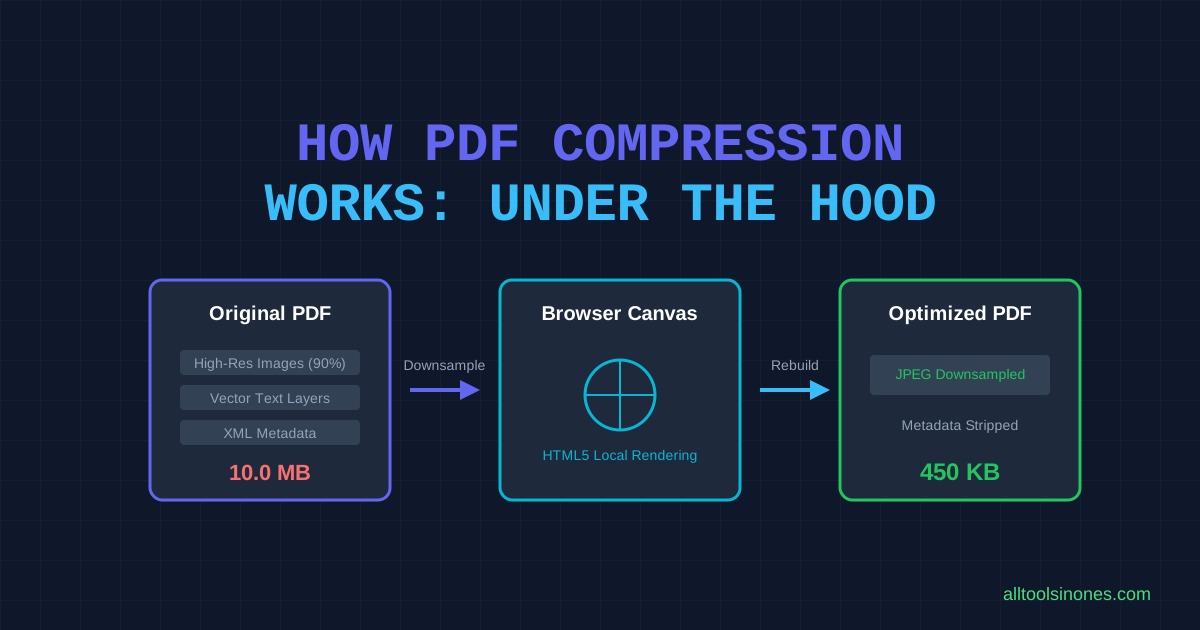
This tool uses client-side canvas rendering to compress files:
- Rasterization: The browser parses the PDF and renders each page onto an HTML canvas element.
- JPEG Encoding: The canvas is converted into a compressed JPEG image using the selected compression quality slider level.
- Assembly: The compressed images are compiled into a new PDF using jsPDF.
This workflow creates a balance: you get a much smaller file, but the text is converted into image format.
Why some PDFs compress more than others
The reduction percentage depends entirely on the contents of the original file:
- Scanned and Image-Heavy PDFs: These files compress the most (often 50% to 80% reduction) because high-resolution camera or scanner images have large amounts of redundant pixel data.
- Text-Heavy Vector PDFs: Documents created from Word with no images will compress very little, as text data takes up minimal space.
- Pre-Compressed PDFs: PDFs that have already been optimized or contain pre-compressed images will show minor improvements.
Does PDF compression reduce quality?
Yes. Because this tool rasterizes pages into JPEGs, there is a tradeoff between file size and visual clarity. Using the Recommended setting keeps text sharp and readable on screens. The Extreme setting yields the smallest size but may show visual artifacts around text and images.
What affects the final file size?
The output file size is determined by:
- Page Count: More pages require more images, increasing the minimum file size.
- Slider Quality Setting: Lower quality factors reduce JPEG file size, leading to a smaller PDF.
- Original Page Dimensions: Larger viewport dimensions require larger canvas sizes, affecting the compression output.
Limitations
- Text Flattening: Because pages are rasterized into images, you cannot select, highlight, or copy text in the compressed PDF.
- Interactive Elements: Clickable links, fillable form fields, and PDF outline bookmarks are flattened and will lose interactivity.
- Device Memory Bounds: Very large documents (e.g. hundreds of pages) processed in-browser can exceed browser heap limits and crash the tab on low-memory devices.
- Initial Connection: The tool requires an internet connection on first load to download the necessary PDF.js worker from a public CDN.
Frequently Asked Questions
How do I compress a PDF?
Select or drag your PDF file into the upload box, choose your desired compression level on the slider, and click "Compress PDF Now". Download the file once completed.
Is the PDF uploaded to a server?
No. The entire conversion process occurs locally inside your browser. No files are uploaded or transmitted to any server.
How much can a PDF be compressed?
Scanned forms and image-rich documents can often be reduced by 30% to 70%. Text-only files see very little change.
Will compression reduce quality?
Yes, some quality loss occurs because pages are converted to JPEG. The Recommended setting maintains good readability on screens.
Can I compress a scanned PDF?
Yes. Scanned PDFs are highly responsive to this compressor because they consist almost entirely of image data.
Can I compress a PDF for email?
Yes. This tool is designed to compress invoices, resumes, and contracts below email limits (such as Gmail's 25MB limit) quickly and privately.
Why did my PDF barely get smaller?
This happens if your PDF contains mostly vector text and no images, or if the images inside are already highly optimized.
What is the maximum file size?
We recommend files under 100MB to avoid browser tab memory exhaustion.
Does the tool work on mobile?
Yes, the tool is mobile-responsive and runs inside mobile browsers, though processing large files depends on your mobile device's RAM.
Which browsers are supported?
All modern web browsers including Google Chrome, Mozilla Firefox, Apple Safari, and Microsoft Edge are fully supported.
Need to convert files instead?
We provide secure, browser-based conversion utilities.