Image to PDF Converter
Convert images (JPG, PNG, WebP) to multi-page PDF instantly in your browser. 100% client-side, pure privacy, no uploads.
What Is an Image to PDF Tool and Why People Use It for JPG to PDF and Convert JPG to PDF Tasks?
An image to PDF converter is an essential online tool that transforms your photos and images into professional PDF documents. Whether you need to convert JPG to PDF for work presentations, combine multiple pics into PDF for reports, or handle PDF to JPG conversions for editing, this versatile tool handles all your document needs. The PDF converter JPG to PDF functionality eliminates the need for expensive software installations, allowing you to convert JPG to PDF format directly in your browser.
How an Image to PDF Converter Simplifies Pics Into PDF Workflow
Modern workflows demand efficiency when handling documents. When you need to convert JPG in to PDF or merge multiple images, traditional methods involve opening heavy desktop applications, navigating complex menus, and waiting for uploads. Our image to PDF converter streamlines this entire process. Simply drag and drop your images, arrange them in your preferred order, and click convert to create PDF from images instantly.
The tool supports bidirectional conversion, meaning you can both convert PDF to JPG and JPG to PDF as needed. This flexibility makes it invaluable for professionals who frequently work with different file formats. Whether you're converting photo to PDF for archiving or need to format PDF to JPG for editing, everything happens in seconds.
Why Users Prefer Online Tools for JPG to PDF and Convert JPG In To PDF
The shift to browser-based tools for JPG and PDF conversion reflects changing user priorities. Desktop software requires installation, updates, and often comes with subscription fees. In contrast, you can convert JPG to PDF free using our online tool without any downloads. The convenience of accessing the JPG to PDF converter online from any device—whether Windows, Mac, Linux, or mobile—makes it the preferred choice for millions of users worldwide.
How an Image to PDF Converter Works for Convert JPG to PDF and PDF to JPG Needs
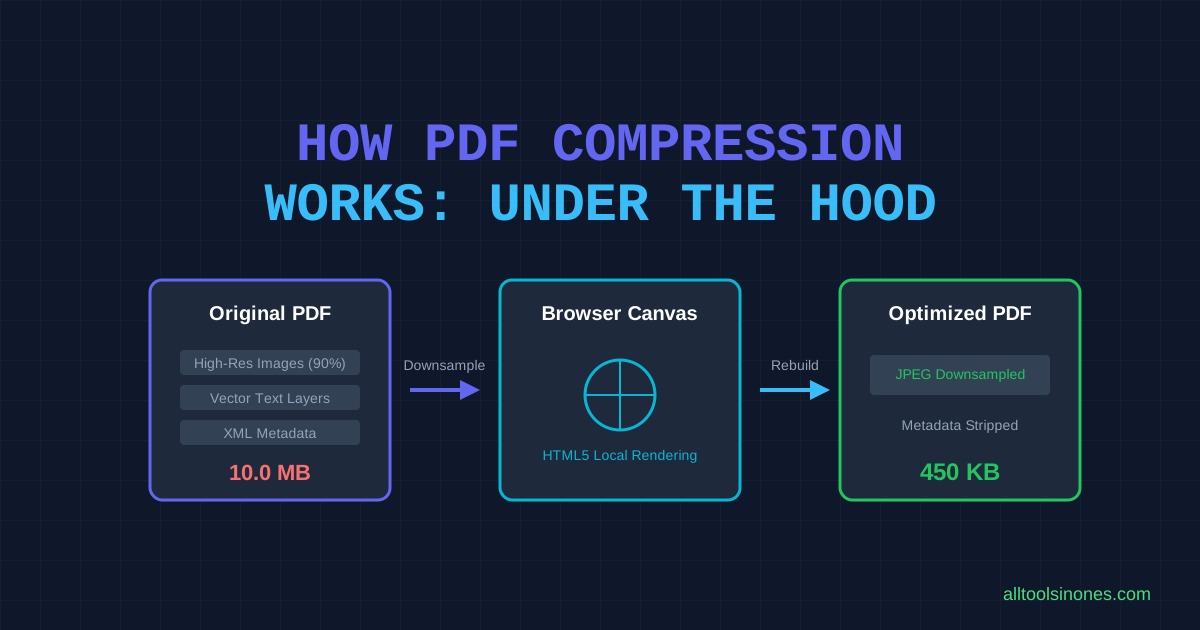
Understanding the technology behind image to PDF conversion helps you appreciate its capabilities. When you convert picture to PDF, the tool reads your image files, analyzes their dimensions and quality, then embeds them into a PDF document structure. This process preserves image quality while creating a universally compatible file format perfect for sharing and archiving.
Understanding the Technology Behind Image to PDF, JPG and PDF, and Convert Image In To PDF
Our PDF converter JPG to PDF uses advanced JavaScript libraries that run entirely in your browser. When you upload images to convert JPG in to PDF, the tool creates a virtual PDF document, calculates optimal page layouts based on your settings (A4, Letter, Legal), and embeds each image as a separate page. The JPG merge in PDF functionality intelligently handles different image sizes and orientations, ensuring professional results.
For PDF to JPG conversion, the process reverses: the tool extracts each page from the PDF, renders it as a high-quality image, and provides downloadable JPG files. This PDF to image capability is particularly useful when you need to edit PDF content in image editing software or export PDF as JPEG for web publishing.
Why Browser-Based Convert JPG to PDF Free and Image to PDF Free Is More Secure
Security concerns plague traditional online converters that require file uploads. When you convert image to PDF free using cloud-based services, your files travel across the internet to remote servers where they're processed and potentially stored. Our browser-based approach eliminates these risks entirely. All processing happens locally on your device when you convert JPG to PDF free, meaning your sensitive documents never leave your computer.
This client-side architecture makes it safe to convert photo to PDF even for confidential business documents, personal photos, or legal paperwork. You can turn picture into PDF with complete confidence that your privacy is protected. No server logs, no data retention, no third-party access—just pure, local processing power.
How to Use Our Image to PDF Tool (Step-by-Step to Convert Picture to PDF and Pics Into PDF)
Converting images to PDF is remarkably straightforward with our tool. Follow these simple steps to make PDF from images or make PDF from photos in under a minute.
Step 1 – Upload Images to Convert JPG to PDF or Combine Images Into PDF
Start by uploading your images. You can drag and drop files directly into the upload zone, click to browse your computer, or paste images from your clipboard. Our image to PDF converter supports all common formats including JPG, PNG, WebP, TIFF, and even HEIC files from iPhones. When you need to combine photos into PDF or merge JPG to PDF, simply select multiple files at once—the tool handles batch processing effortlessly.
Step 2 – Arrange and Create PDF From Images or Make PDF From Photos
Before you create PDF from images, arrange them in your desired order by dragging thumbnails. This is crucial when you combine images into PDF for presentations, reports, or photo albums where sequence matters. Next, configure your PDF settings including page size (A4, Letter, Legal, or Auto), orientation, margins, and image fit options.
Step 3 – Export PDF or Convert PDF to JPG High Quality as Needed
Click the "Convert to PDF" button to make PDF from images. The conversion typically takes 2-10 seconds depending on image count and size. Once complete, your PDF downloads automatically. If you later need to convert PDF to JPG high quality, simply upload the PDF and select the extraction option.
Best Use Cases for Image to PDF and Convert Picture to PDF Tasks
Students and Professionals Using JPG to PDF Free and Convert Photo to PDF Tools
Students frequently need to convert photo to PDF when submitting assignments. Business professionals use JPG to PDF free tools to create presentations and compile reports. The ability to convert picture to PDF free without software costs makes it accessible to freelancers and small businesses.
Office Users Using Convert Image to PDF Free for Documents and Scans
Office environments generate countless documents requiring PDF conversion. When you scan image to PDF from physical documents, you create digital archives that are easier to store and share. Legal departments value the ability to convert PDF file to JPG for editing specific pages.
Creators Converting Pics Into PDF or Picture Into PDF for Projects
Content creators rely on image to PDF tools for portfolio creation. Photographers make PDF from photos to deliver wedding albums and event coverage. Graphic designers use TIFF to PDF conversion for high-resolution print work.
Why Our Image to PDF Converter Is Better for JPG to PDF Online and Convert JPG to PDF Format
100% Private Convert Image In To PDF (Client-Side Processing)
Privacy is our top priority. When you convert JPG to PDF format using our tool, everything processes locally in your browser. This makes it safe to convert image in to PDF even for sensitive documents. No server logs, no data retention, no third-party access.
Faster JPG Merge In PDF and Combine JPG to PDF Than Traditional Apps
Our JPG to PDF online tool eliminates lengthy setup steps. The JPG merge in PDF functionality handles batch processing efficiently, whether you need to merge JPG with PDF or combine JPG to PDF with dozens of images.
Multi-Format Support Including PNG to PDF, TIFF to PDF, and Scan Image to PDF
Our tool supports comprehensive format compatibility. You can convert PNG file to PDF, transfer PNG to PDF, handle TIFF to PDF for professional printing, and even process HEIC files from iPhones.
Features of Our Image to PDF Tool for Convert JPG to PDF Free and Turn Image Into PDF
Batch Processing for JPG to PDF Converter Online and Make PDF From Images
Batch processing saves enormous time when you need to make PDF from images in bulk. Upload dozens or hundreds of images simultaneously. The JPG to PDF converter online processes them all in one operation, creating either individual PDFs or one combined document.
Options to Convert PDF to Image, PDF to JPG Online Free, and Export PDF as JPEG
Bidirectional conversion sets our tool apart. Not only can you convert JPG to PDF, but you can also convert PDF to JPG online when you need to extract pages for editing. The PDF to JPG online free functionality renders each PDF page as a high-quality image file.
High Quality PDF Output for Convert Photo to PDF Free and Convert PDF to Picture
Quality preservation is critical when you convert photo to PDF free. Our tool maintains original image resolution and color accuracy throughout the conversion process. For PDF to JPG high quality conversion, the tool uses advanced rendering algorithms that produce crisp, clear images.
Privacy & Security for Image to PDF Free, Convert JPG to PDF Free, and Convert JPG JPEG Tasks
Why No Upload Is Required for Convert Image to PDF Free Tools
Traditional online converters require uploading your files to their servers for processing. When you convert JPG to PDF free using our tool, none of these risks exist because your files never leave your device. The browser-based architecture means all processing happens locally using JavaScript and WebAssembly.
Local Processing for All JPG to PDF, PDF to JPG, and Convert Picture to PDF Free Functions
Every feature—whether you convert PDF to JPG, merge JPG with PDF, or combine images into PDF—uses local processing exclusively. You can convert photo to PDF free for sensitive documents without any privacy concerns.
FAQ About Image to PDF, JPG to PDF Online, and Convert Picture to PDF Free
Can I Convert JPG to PDF Free Without Installing Software?
Absolutely! Our JPG to PDF free tool runs entirely in your web browser, requiring zero installations. The free JPG to PDF converter works on Windows, Mac, Linux, and even mobile devices, providing universal accessibility without downloads.
Can I Convert PDF to JPG Free and Still Get High Quality?
Yes! When you convert PDF to JPG free using our tool, you can select quality settings to ensure optimal results. The PDF to JPG high quality option renders each page at maximum resolution, preserving text sharpness and image detail.
How Many Photos Can I Combine Images Into PDF or Combine Photos Into PDF?
There's no artificial limit on how many images you can combine images into PDF or combine photos into PDF. Most modern computers can easily handle 50-100 high-resolution images in a single conversion. When you merge JPG to PDF, the tool processes them efficiently using batch operations.
Final Thoughts — The Most Trusted Image to PDF Tool for JPG to PDF, Convert JPG to PDF, and Convert PDF to JPG Online
In today's digital workplace, the ability to quickly and securely convert JPG to PDF or convert PDF to JPG online is essential. Whether you're a student submitting assignments, a professional preparing presentations, or a creator building portfolios, our image to PDF converter provides the perfect solution without compromising your privacy or requiring expensive software.
What makes our JPG to PDF online tool exceptional is the combination of powerful features, absolute security, and zero cost. You can convert image to PDF free, merge JPG to PDF, combine photos into PDF, and convert PDF to image all within the same interface.
Ready to experience the fastest, most secure way to convert photo to PDF or turn picture into PDF? Upload your first images now and discover how effortless it is to create PDF from images with our advanced image to PDF free tool. Join millions of satisfied users who trust our platform for all their JPG and PDF conversion needs.