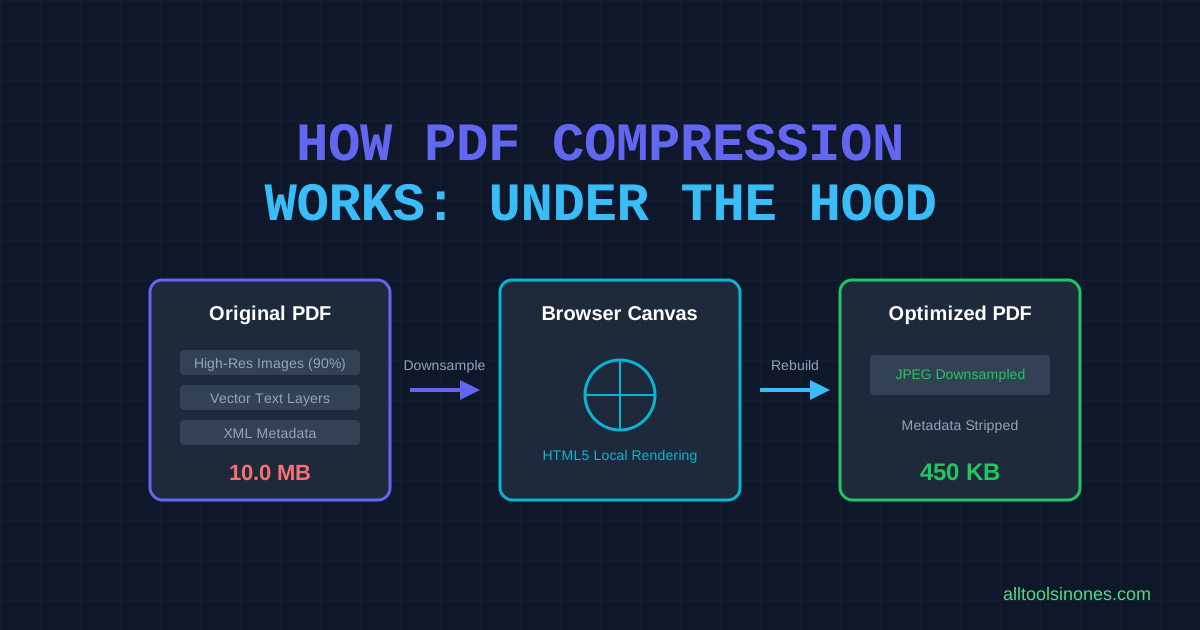
When you compress a PDF, you are modifying the internal structure of the file to reduce its size. PDFs are complex wrappers that can store text vectors, fonts, vector paths, interactive forms, metadata, and high-resolution images. Optimization can target any of these layers. In this article, we explain the mechanics of PDF compression and how local browser-based compression compiles files.
Direct Answer: PDF compression works by reducing the size of elements inside the document. Traditional compressors strip unused metadata, subset fonts, and downsample embedded images. Our client-side compressor optimizes files by rendering each page onto a headless canvas and re-assembling them as JPEGs, shrinking image-heavy documents locally on your device CPU.
What Is PDF Compression?
A PDF is not just a digital document page; it is a structured database of object trees. A single PDF file can contain:
- Metadata: Structural definitions, author tags, and editor history.
- Embedded Fonts: Complete font character vector descriptions.
- Vector Graphics: Coordinate instructions for drawing shapes, lines, and boxes.
- Raster Images: JPEG, PNG, or raw pixel matrices.
- Content Streams: Layout instructions tying objects to coordinate points on the page.
Compression reduces size by downsampling high-resolution images, replacing font sets with subsets containing only used characters, pruning empty objects, and stripping non-essential metadata.
Why Are Some PDFs Much Larger Than Others?
The original generation method of a PDF determines its starting footprint:
- Text-Heavy Vector PDFs: Documents exported directly from Word containing only characters and style coordinates require very little space (typically 20KB to 100KB for dozen-page files).
- Scanned Documents: Scanners save pages as raw full-page images. A scanned PDF is simply a container holding massive pictures, resulting in huge file sizes (often 2MB to 10MB per page).
- Image-Heavy Documents: Presentation slide decks and catalog PDFs containing high-DPI photos are naturally heavy.
- PDFs with Compressed Assets: Documents that have already been optimized or utilize low-DPI graphics cannot be reduced much further.
How Our Browser-Based PDF Compressor Works
Our compressor utilizes client-side rendering to optimize files in your browser tab context. The browser runs the following verified pipeline:
[Selected PDF File]
       │
       ▼ (FileReader reads local bytes)
[In-Memory ArrayBuffer]
       │
       ▼ (Parsed locally by Mozilla PDF.js)
[HTML5 Canvas Viewport (1.5x scale render)]
       │
       ▼ (canvas.toDataURL JPEG downsampling)
[Optimized JPEG Page Images]
       │
       ▼ (jsPDF reconstruction layout)
[New Reconstructed PDF Blob]
       │
       ▼ (URL.createObjectURL link)
[Saved back to Local Disk]
Each phase is executed locally on your machine CPU: your file stays inside the browser sandbox, and the reconstructed result is saved directly from browser RAM to your hard drive.
Why Rendering Pages Changes the PDF
Because our browser-based engine optimizes files by rendering each page onto an HTML canvas and converting the drawings into JPEG images (rasterization), the structural layers of the PDF are flattened. This has direct consequences:
- Text Layer Loss: The text character descriptions are converted into pixels. You cannot select, copy, highlight, or search text in the output PDF.
- Interactive Blocks: Fillable form fields and clickable hyperlinks are flattened and will lose functionality.
- Accessibility: Screen-reading software for visually-impaired users cannot read flattened images.
- Vector Scaling: Zooming in past 100% will reveal typical JPEG pixelation artifacts rather than crisp vector lines.
Why JPEG Encoding Can Reduce File Size
JPEG is a lossy compression format. It compresses pixel maps by grouping pixels into blocks and discarding details that human vision cannot easily distinguish. When the quality slider is set (from 0.1 to 0.9):
- A setting of 0.5 (Recommended) strikes a solid balance, shrinking images drastically while keeping text clear.
- A setting of 0.1 (Extreme) reduces the size to a minimum but creates noticeable block artifacts around letters.
Why Some PDFs Compress Extremely Well
Documents that respond best to our local canvas pipeline are scanned invoices, resumes, and signed contracts. Since these files are essentially high-DPI scans, downsampling them to a 1.5 canvas viewport scale at 0.5 quality factor reduces the pixel map weight by 50% to 80% without losing overall legibility.
Why Some PDFs Barely Shrink
If a PDF is a text-only vector document, rendering it into JPEGs will actually increase its size, because a JPEG pixel map is much heavier than a simple character string definition. Pre-optimized image portfolios or vector-only drawings will also see minimal size improvements.
Does PDF Compression Reduce Quality?
Yes. Rasterizing page vectors into JPEG images introduces lossy artifacts. Recommended settings keep contrast clear for reading on computer and mobile screens, but print outputs may appear less sharp. Below are qualitative recommendations for our tool:
- Digital Submission (Email/Web Portals): Highly recommended. Text is completely readable, and size meets upload rules.
- High-Resolution Printing: Not recommended. Fine graphics and vector lines will lose sharp print borders.
- Check before submit: Always double check layout margins in output views.
Why a Smaller PDF Is Not Always a Better PDF
Reducing file size involves trade-offs. A smaller PDF is highly portable, but it comes at the cost of text searchability, character accessibility compliance, and professional print resolution. Maintain a backup of your original vector PDFs before running any lossy flattening tools.
Client-Side Compression vs Server-Side Compression
Neither architecture is universally superior; each solves different engineering problems:
| Feature | Client-Side (Local) | Server-Side (Cloud) |
|---|---|---|
| Data Privacy | Excellent (Files remain local, zero network transmission) | Vulnerable (Files uploaded and stored on remote drives) |
| Text Search | Flattened (Text layers are rasterized into canvas images) | Preserved (Advanced code subsets fonts and prunes paths) |
| File Limits | Medium (Bound by device browser memory/RAM limits) | High (Server clusters can process gigabyte files) |
How to Choose the Right Compression Approach
Use a local client-side tool if privacy is your main priority, especially for financial, tax, or medical scans. Choose a cloud-based vector optimizer if you must preserve text highlights, active hyperlinks, outline structures, or if you need to run automated scripting pipelines.
Frequently Asked Questions
Does compression delete PDF text?
Our tool does not delete text but flattens it. The visual appearance is preserved, but you cannot select or copy the characters.
Why did my PDF size increase?
This occurs when compressing a text-only vector PDF. Image pixel maps are larger than simple character coordinate lines.
Can I search for text inside the compressed PDF?
No. Pages are rasterized to images, so standard search overlays will not detect characters.
Factual Sources referenced: Adobe PDF Reference Guide (v1.7), Mozilla PDF.js architectural specs, and jsPDF assembly documents.