Compress PDF Files Privately
Reduce PDF file size locally in your browser. Your documents are processed entirely on your device and are never uploaded to any server.
Select PDF File
Supported: PDF documents up to 100MB.
How your PDF is processed
In-Browser Execution
All parsing, image downsampling, and PDF rebuilding happen locally in your web browser tab. Once the code is loaded from the CDN, processing runs client-side on your device CPU.
No Server Transmission
We do not upload or send your documents to any remote cloud servers. Once you refresh or close this tab, the file data in the browser memory is discarded.
When 100KB PDF Limit is Required
- 📝Online Forms: Some govt/company portals have 100KB PDF limits
- 📧Email Attachments: Corporate email systems with strict limits
- 🌐Web Uploads: Websites with bandwidth restrictions
- 💾Storage Saving: Archiving thousands of documents
Compress PDF to Exactly 100KB or Less
Need to compress a PDF to an ultra-small size? Some online forms, corporate email systems, and web portals have strict 100KB file size limits. Our free PDF compressor uses extreme compression to reduce your PDF to 100KB or less while maintaining readable quality.
Why 100KB Limit Exists
The 100KB limit is enforced for:
- Bandwidth Savings: Reduces server bandwidth costs
- Fast Loading: Ensures instant page loads
- Database Efficiency: Smaller files for millions of records
- Mobile Optimization: Quick downloads on slow connections
- Storage Limits: Prevents database bloat
⚠️ Quality Trade-off:
Compressing to 100KB requires extreme compression. Text will remain readable, but images may be pixelated. Use only when 100KB limit is mandatory!
Where 100KB PDF Limits Apply
- Government Portals: Some state govt application forms
- Job Portals: Certain recruitment websites
- University Applications: Some admission portals
- Corporate Systems: Internal document management systems
- Contest Submissions: Competition entry forms
How to Achieve 100KB PDF Size
- Upload your PDF (any size)
- Select "Extreme" compression level
- Click "Compress PDF Now"
- Download ultra-compressed PDF
- Verify file size is under 100KB
💡 Pro Tip:
For best results at 100KB, start with a PDF that has fewer pages (1-3 pages ideal). Multi-page PDFs may require very aggressive compression to reach 100KB!
Tips for Better Quality at 100KB
- Reduce Pages: Keep only essential pages
- Remove Images: Delete unnecessary images before compressing
- Use Text: Text-based PDFs compress better than scanned documents
- Black & White: Convert to grayscale before compressing
- Lower Resolution: Reduce image DPI to 72-150
What to Expect at 100KB
Text Documents:
- Text remains readable
- Fonts may appear slightly pixelated
- 1-2 pages of text fit comfortably
- 3-5 pages possible with extreme compression
Image-Heavy Documents:
- Images will be heavily compressed
- Expect visible pixelation
- Colors may appear washed out
- Only 1-2 images fit at 100KB
❌ Not Suitable For:
- High-quality presentations
- Professional portfolios
- Legal documents requiring clarity
- Scanned documents with fine print
- Multi-page reports with images
Alternative Approaches
If 100KB is too restrictive:
- Split PDF: Divide into multiple 100KB files
- Remove Pages: Submit only essential pages
- Convert to Images: Submit as JPG instead of PDF
- Contact Support: Request higher size limit
- Use Link: Upload to cloud and share link
100KB vs Other PDF Sizes
- 100KB: Ultra-small, extreme compression (this tool)
- 200KB: Small, aggressive compression
- 500KB: Medium, balanced compression
- 1MB: Light compression, good quality
- 5MB+: Minimal compression, best quality
✅ Best Use Cases:
Simple text documents | Resume/CV (1-2 pages) | Application forms | Certificates | ID proof copies
Troubleshooting
Can't get under 100KB?
- Remove all images and photos
- Delete unnecessary pages
- Convert to black & white
- Use lowest compression quality
- Consider splitting into multiple files
Quality too poor?
- 100KB may be too restrictive for your document
- Try 200KB or 500KB compression instead
- Contact the portal to request higher limit
- Submit as multiple smaller PDFs
Privacy & Security
- ✅ All compression happens in your browser
- ✅ No files uploaded to servers
- ✅ Complete privacy guaranteed
- ✅ Works offline
- ✅ Free forever
Related Conversion & Utility Tools
Handpicked utility tools from the same category that you might find useful.
Related Articles
Insights and guides to help you make the most of our tools.

Is Your 'Free' PDF Converter Stealing Your Data? Why Server-Side Uploads Are Dangerous
You just uploaded your bank statement to a free PDF converter. Do you know where it went? Read this urgent guide on the dangers of server-side data extraction and how to protect yourself.
How to Compress a PDF Without Uploading It
Need to shrink a PDF document but worried about data leaks? Learn how browser-based compression works, its security advantages, and technical limitations.
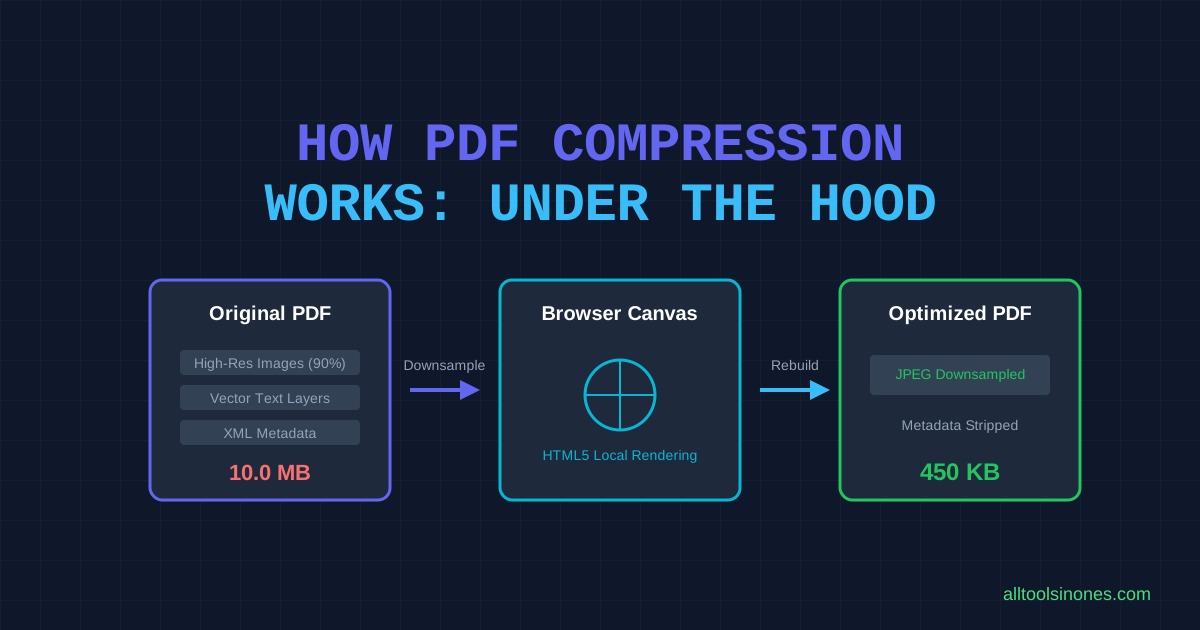
How PDF Compression Works: What Happens to Your File
Ever wondered what actually happens when you compress a PDF? Take a deep look into images, layouts, local rendering, and quality tradeoffs.